<img height="1" width="1" style="display:none" src="https://www.facebook.com/tr?id=1092942966995594&amp;ev=PageView&amp;noscript=1">
The Concrete Cutter's Playbook
  • 78 tools in 39 files
  • Your rates, not a price list
  • Excel, Google Sheets and Word
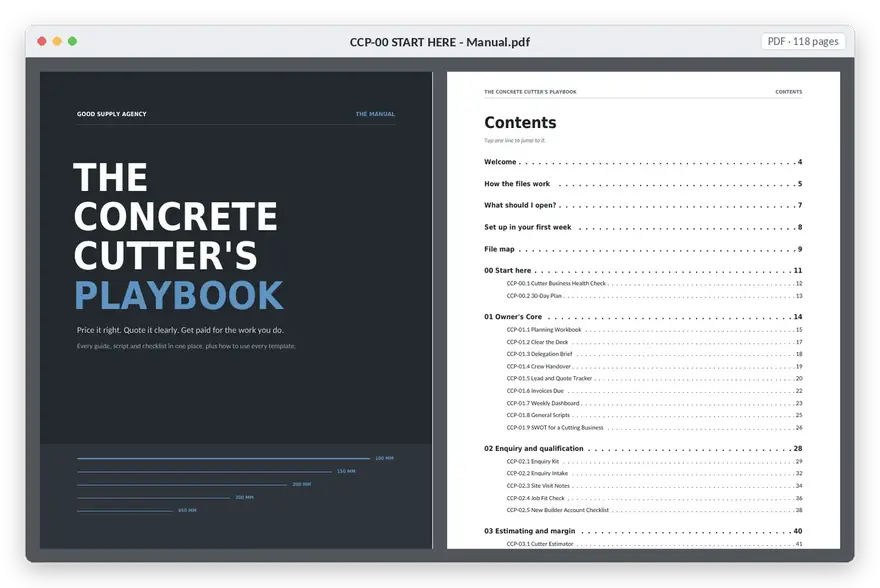
  • 117-page manual
Sound familiar?

The cutting's the easy part.

It's 9:40 at night and you're pricing tomorrow's job from memory and a calculator, hoping you remembered travel, blades and the clean-up.

The quote goes out. Nine days later, nothing. The builder booked someone else.

On site the slab's thicker than the plans said. You do the extra cut, then argue about it on the invoice.
  1. 01
    Pricing from memoryTravel, blade wear and standing time left off the quote.
  2. 02
    Quotes left hangingSent, never followed up, lost to whoever rang back.
  3. 03
    Extra work nobody approvedDone on the day, disputed on the invoice.
  4. 04
    Busy but not sure it paidNo planned vs actual, so you can't tell which jobs made money.
  5. 05
    Waiting to get paidNo reminder system, so late payers stay late.
What it helps you fix

Five places cutting jobs lose money. Fixed.

Price every job right

Five estimators on your own rates, with built-in checks before the quote goes out.

Win more quotes

A clear quote layout, cover email and a follow-up sequence.

Get extra work signed off

Record it, cost it, and get written approval before you cut.

Know which jobs pay

Planned vs actual and a margin review for every job.

Get paid on time

Invoice checklist and friendly-then-firm payment reminders.

Get the playbook · $199.50 →
Instant digital access
Open it up

Open the playbook.

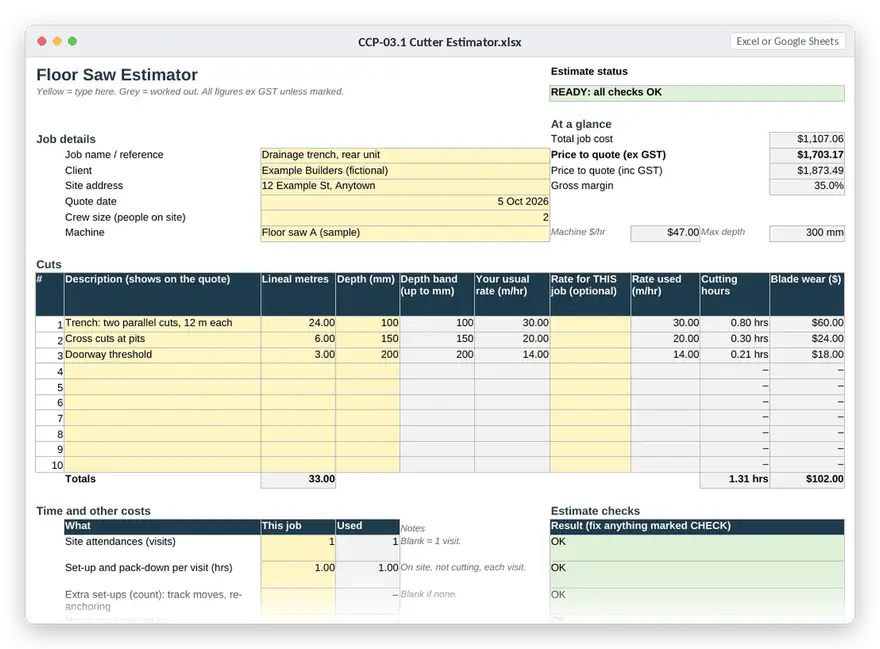
Real screenshots of the files you get. Sample figures are fictional and worked by hand, so you can check every number.

Pay once. Use it on every job.
Stop under-pricing the next one.
Get the playbook · $199.50 →
What's included

Every file, by module.

Tap a module to see what's in it. Everything opens in Excel, Google Sheets or Word, and every calculator has a filled-in worked example.

78tools
39files
117page manual
16worked examples
00Start here2 files
  • xlsxCCP-00.1 Cutter Business Health Check 25 questions, scored across 8 areas. Tells you which three tools to open first.
  • pdfCCP-00.2 30-Day Plan Week-by-week plan for setting up the pack, printable from this manual.
01Owner's Core9 files
  • xlsxCCP-01.1 Planning Workbook Weekly planner and daily priorities, cutter version.
  • xlsxCCP-01.2 Clear the Deck Brain dump and task triage for overloaded weeks.
  • docxCCP-01.3 Delegation Brief Hand a task to someone else properly, once.
  • docxCCP-01.4 Crew Handover Hand a job or a role over to another crew member.
  • xlsxCCP-01.5 Lead and Quote Tracker Every enquiry and quote, follow-up dates for day 2, 7 and 14, win rate, and why you lose.
  • xlsxCCP-01.6 Invoices Due What's owed, how late, and who to chase.
  • xlsxCCP-01.7 Weekly Dashboard Cash in 4 weeks (if everyone pays, and if nobody does), overdue invoices, crew capacity for 4 weeks, and last week's sales numbers.
  • docxCCP-01.8 General Scripts Unanswered enquiry, delay, boundary and polite refusal messages.
  • docxCCP-01.9 SWOT for a Cutting Business Strengths, weaknesses, opportunities and threats, with prompts and a 'so what' step.
02Enquiry and qualification5 files
  • docxCCP-02.1 Enquiry Kit Call-answering script, missed-call SMS, builder vs homeowner questions, photo request, urgent-work reply.
  • docxCCP-02.2 Enquiry Intake One-page form for every new enquiry.
  • docxCCP-02.3 Site Visit Notes What to check and measure on a site visit.
  • xlsxCCP-02.4 Job Fit Check Go / no-go scoring before you spend time quoting.
  • docxCCP-02.5 New Builder Account Checklist Details, terms and checks before you start working for a new builder.
03Estimating and margin1 file
  • xlsxCCP-03.1 Cutter Estimator Five estimators (floor, wall, core, hand saw, cut and remove) on one set of rates, plus Extra Work, Minimum Charge, Travel Zones and Quote.
04Quoting and follow-up4 files
  • docxCCP-04.1 Quote Kit Scope questions for each service, inclusions / exclusions / assumptions, cover email, follow-up sequence, price objections, lost and stalled quotes.
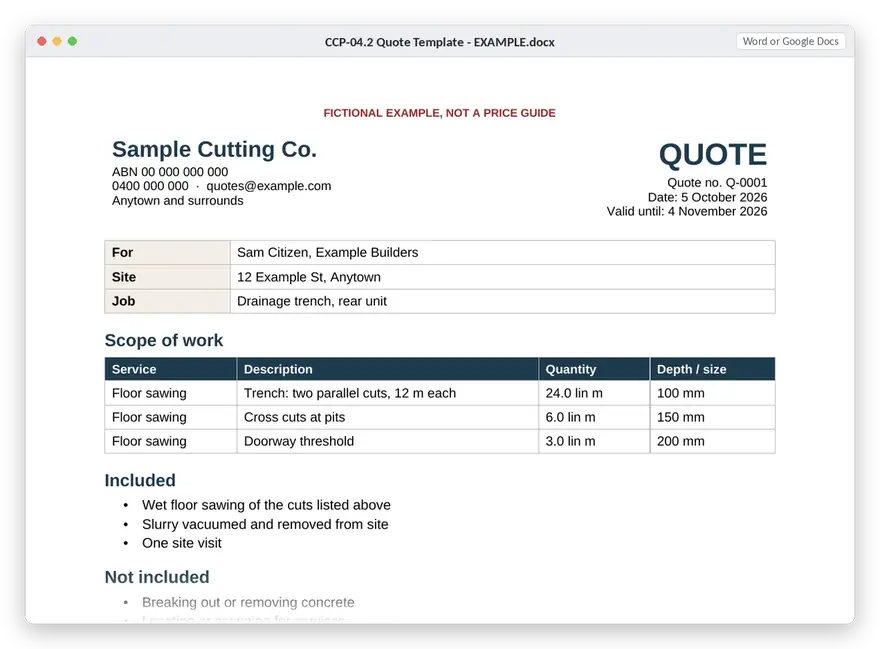
  • docxCCP-04.2 Quote Template Editable Word quote layout, for when you'd rather not use the estimator's Quote tab.
  • xlsxCCP-04.3 Schedule of Rates Build your own rate card for builders who want set rates, from your estimator numbers.
  • docxCCP-04.4 Hidden-Cost Questions The questions to ask before quoting so access, water, slurry and standing time don't eat your margin.
05Booking and mobilisation4 files
  • docxCCP-05.1 Booking Kit Booking confirmation, site contact sheet, access / water / power / parking questions, pre-start info request.
  • xlsxCCP-05.2 Crew and Equipment Who and what is on which job, plus crew tickets and training register.
  • docxCCP-05.3 Job Handover Pre-job crew brief: scope, assumptions, site contact, what to photograph.
  • docxCCP-05.4 End of Day Notes Quick end-of-day record that feeds Job Costing.
06On-site changes1 file
  • docxCCP-06.1 On-site Changes Kit Unexpected-condition record, variation request, short written approval (SMS and email), delay update, return-visit confirmation, photo checklist.
07Closeout and cash4 files
  • xlsxCCP-07.1 Job Costing Planned vs actual for every job, a day log that doubles as a timesheet, and a margin review.
  • docxCCP-07.2 Closeout Kit Completion record, invoice handover checklist, payment reminders, overdue and disputed-invoice messages, lessons learned.
  • xlsxCCP-07.3 Price Rise Calculator What your prices need to move by when costs go up.
  • docxCCP-07.4 Price Rise Letter Telling builders about a price change, plainly.
08Repeat work and marketing7 files
  • docxCCP-08.1 Capability Statement Two-page capability statement template for builders and head contractors.
  • docxCCP-08.2 Marketing Scripts Builder introduction, dormant-client check-in, review and referral requests.
  • xlsxCCP-08.3 Key Accounts Key-account tracker, builder target list and visit plan, customer concentration check, permissions log.
  • docxCCP-08.4 Marketing Kit Job-photo checklist, photo filing system, case-study worksheet, photo and client permission record.
  • docxCCP-08.5 Builder Prequalification Checklist What builders usually ask for before you get on their list.
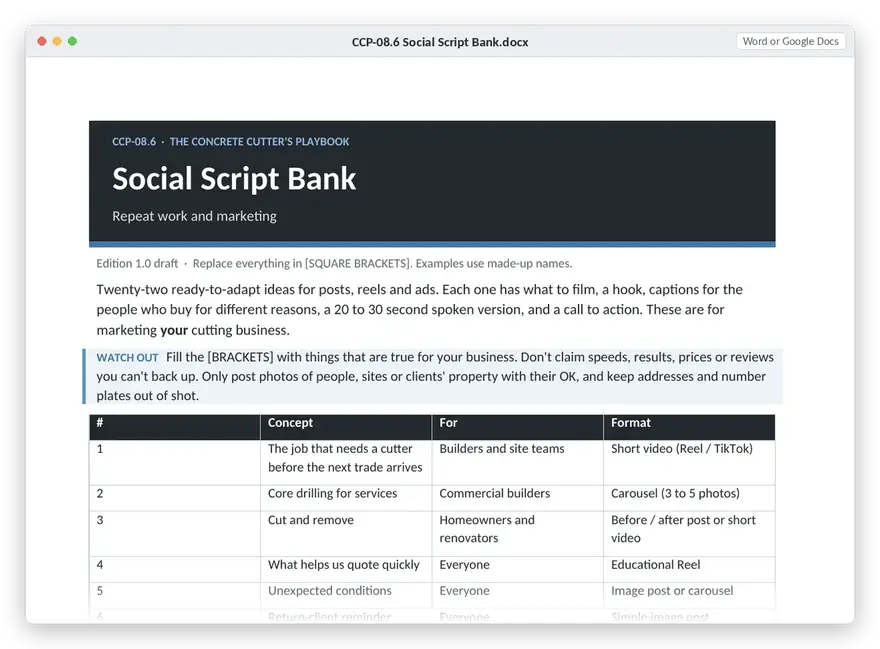
  • docxCCP-08.6 Social Script Bank 22 concepts for posts, reels and ads: what to film, hooks, captions for builders and homeowners, spoken versions, calls to action.
  • xlsxCCP-08.7 Social Index Plan and track which concepts you've posted.
09Optional AI1 file
  • docxCCP-09.1 AI Prompts Guardrails, plus prompts for quote emails, customer updates, variations, invoicing summaries, case studies and weekly plans.
10Know your numbers1 file
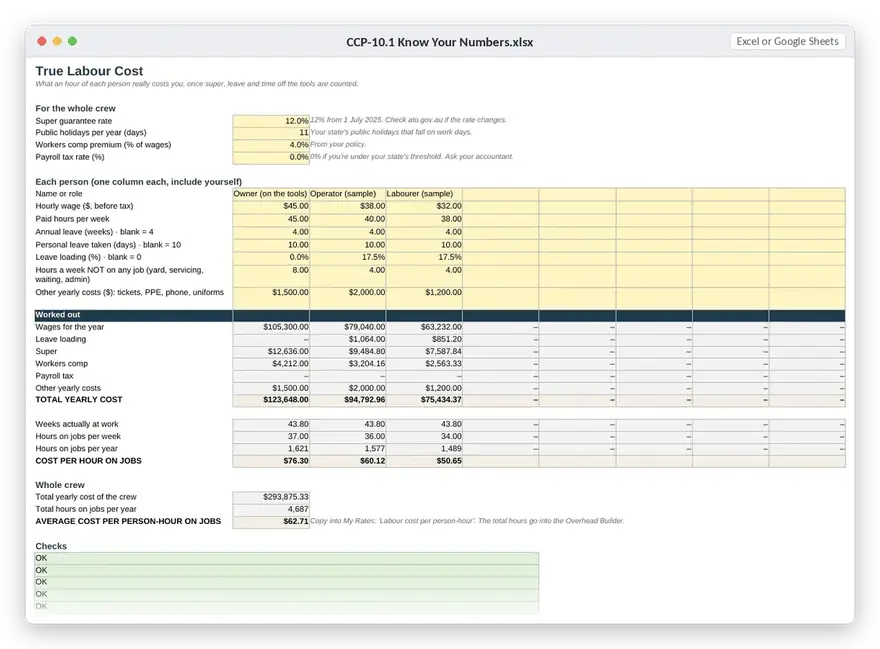
  • xlsxCCP-10.1 Know Your Numbers Labour cost, overhead, production rates, blade and bit life, equipment and repairs, buy vs hire, utilisation, and what to send to My Rates.
Get the playbook · $199.50 →
Instant digital access
How to put it to work

Set it up once. Use it every day.

  1. Take the health check25 questions that tell you which three tools to open first.
  2. Enter your ratesLabour, overhead, machines and blades, once. Every estimator uses them.
  3. Quote, book, runUse the kits on the next real job: quote, booking, handover, changes.
  4. Check the marginPlanned vs actual after each job. Adjust your rates when the numbers say so.
Cutter Estimator
Why it was made

Built for the trade, not adapted from someone else's.

Generic business templates don't know what a depth band is, why the slurry matters or who pays for standing time. This does.

Good Supply Agency builds lead and follow-up systems for trade and service businesses. The Playbook puts the paperwork side of a cutting business in one place, so the office work stops eating your nights.

Get the playbook · $199.50 →
Instant digital access
Is it for me?

Is it right for your business?

It's for you if

  • You run a concrete cutting or drilling business, on your own or with a small crew.
  • You quote, book, chase and invoice yourself, usually after hours.
  • You want to know your numbers, not guess them.
  • You'd rather set things up once than reinvent every quote.

It's not for you if

  • You want someone to tell you what to charge. There's no price list in here.
  • You need SWMS or safety paperwork. That isn't included.
  • You're after legal contracts or accounting software.
Do I need a CRM? No. Everything runs in spreadsheets and Word files you already have.
I already run ads. The quote, follow-up and marketing kits help you convert what they bring in.
I work alone. It's built for owner-operators first. The crew tools are there when you grow.
The offer

Everything in The Concrete Cutter's Playbook.

  • Cutter Estimator: floor, wall, core, hand saw and cut-and-remove, on your own rates
  • Quote kit, quote template, schedule of rates and hidden-cost questions
  • Booking, crew handover, on-site changes and closeout kits
  • Job costing: planned vs actual and margin review
  • Know Your Numbers: labour, overhead, blades, buy vs hire
  • 22 social scripts, capability statement and marketing kit
  • Owner's Core planning tools and optional AI prompts
  • The 117-page START HERE manual and 16 worked examples
$399$199.50Launch price · ends Sat 31 Oct

Launch price ends Saturday 31 October. Full price after that is $399.

Get the playbook · $199.50 →
Instant digital access

Secure checkout by Stripe. The 50% discount is already applied. You go straight to your download page after paying.

Licence for one business. You and your team can use it.Free updates to this edition for 12 months, by email.Questions: hello@goodsupplyagency.com.au
Questions

Fair questions.

Does it tell me what to charge?

No. You enter your own labour cost, overhead, machine and blade costs and target margin. The estimator does the maths and shows its working.

Will it work in Google Sheets and on my phone?

Yes. The spreadsheets open in Excel and Google Sheets. Scripts come in Word and as plain text you can copy on your phone.

Do I need to use AI?

No. Every tool works without it. The AI prompts are an optional extra, written to stop the AI making up quantities, prices, dates or approvals.

Is this safety or legal paperwork?

No. There are practical site-prep checklists, but no SWMS, and the templates aren't contracts or legal notices.

How do I get it?

It's a digital download: the manual plus the template files in organised folders.

Do I need the Business Owner's Back Pocket as well?

No. The general planning tools you need are already in here, in the Owner's Core module.

Less time on paperwork. More on the saw.

One payment. Yours to keep, and to use on every job.

Get the playbook · $199.50 →
Instant digital access